
Tailor Agent
Tailor's built-in AI teammate. It sees your page and your data, drafts the work, and executes on your approval.
Overview
Tailor Agent opens from Ask Tailor in the top right of app.tailorhq.ai, and it runs in the browser extension. It is also embedded inside the specialized agents rather than being separate from them: Test Ideas, Ads Audit, the AEO/GEO audit, and any recurring agent your team builds on top of your site and your other data are all the same agent, pointed at a job.
Ask it about your performance and it answers with the same numbers your dashboards show, using the same date boundaries and conversion math. Ask it to do something and it does the work: builds tailored pages, drafts experiments, edits copy, and reports back with a preview.
Reading signals is the common part. Shipping from them is not.
Plenty of tools will read your data and suggest what to try. Tailor Agent builds the suggestion into a real change on a real page, targeted at the segment it was written for, that you launch with one click. From there the same change can run as an A/B test, run as permanent personalization for that segment, or be ramped to everyone.
The header pill always shows which page it's looking at. It keeps working if you minimize the panel, navigate, or briefly lose connection, and you can queue a follow-up while it's still answering.
What It Reads
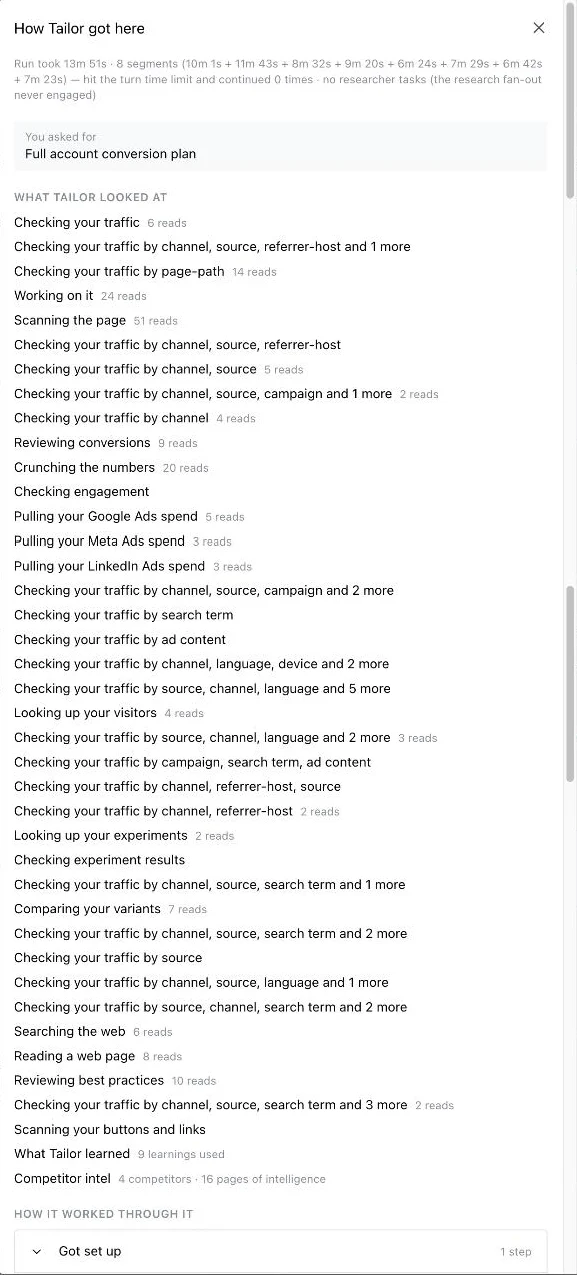
The agent is only as good as what it can see, so it is wired into every source Tailor already has. Not just the page in front of it: your analytics, your ad accounts, the people landing on the page, the tests you have already run, and what your competitors are doing.
Your traffic
Sessions broken down by channel, source, campaign, search term, ad content, referrer, page path, device, and language. This is how it finds the segment worth a test.
Your pages
It renders the page and reads the real DOM, including every button and link, so a proposed change points at an element that actually exists.
Your ad accounts
Spend and delivery from Google, Meta, and LinkedIn, so the ranking follows the money rather than raw pageviews.
Who is visiting
Company, industry, and role from visitor identification, where you have it enabled.
Your past tests
Every experiment you have run, its result, and its variants, so it stops re-proposing something you already disproved.
Competitor intelligence
Pages Tailor tracks on the competitors you have added, including how their messaging and offers have changed. Tracked from the Competitors section of the dashboard.
It also reads what Tailor has learned on your account (a standing set of conclusions from your own results), CRO best practices, and the open web when it needs context a page does not carry.
None of this is a black box. Every plan carries a How Tailor got here link that lists what it read, source by source, with the number of reads against each one.
What It Can Do
Analyze
Explore traffic, segments, experiments, and enrichment data conversationally. Numbers match the dashboards.
Build tests
Draft complete experiments, including multi-variant tests (control plus several arms, traffic split evenly, preview link per arm).
Edit and add elements
Rewrite copy, restyle elements, and insert brand-new ones (badge, banner, headline, image, section) styled to match your page.
Attach images
Add an image with the + on the chat input and tell it where the image goes. Tailor rehosts it on its CDN.
Insert custom scripts
Paste a script or describe what you need, and the agent adds it to the tailored page.
Translate pages
Whole-page translation with a live progress checklist. See Page Translation & Autopilot.
It verifies its own work
When the agent builds or changes a page, it renders the preview to confirm the change actually applied, and checks new elements for overlap with existing content. If it can't verify something, it says so plainly instead of guessing.
Ask For One Test, Or A Whole Plan
Reading the data is the setup. The point is that the agent then builds the test, so approving it is the only work left for you.
Ask for a single test and you get a single test: "test a shorter headline on the pricing page for LinkedIn traffic". Ask for the whole account and you get a ranked plan instead, grouped into waves you can launch in parallel, with the reach of each wave worked out so you are not running twenty tests that all need the same visitors.
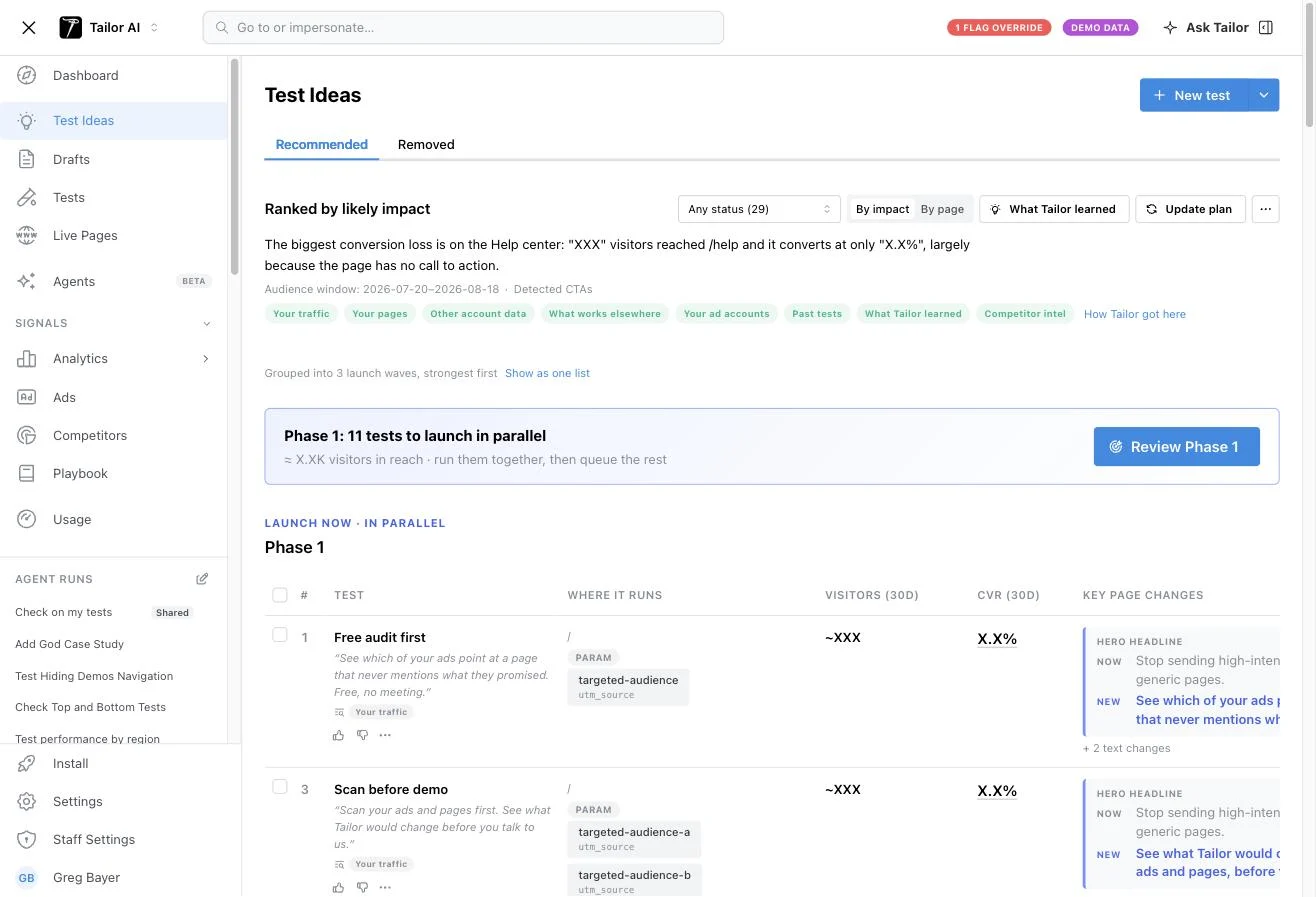
Each test arrives complete: the hypothesis behind it, the audience it targets, the pages it runs on, its expected reach, the exact copy changes, and a before and after preview from your live site. Nothing is live until you approve it. See Test Ideas for how the standing queue works.
The hypothesis states the one change, the effect expected from it, and the measured reason to believe it. It is the brief the agent builds against, so you can check that what it built is what it proposed.
Save It As An Agent
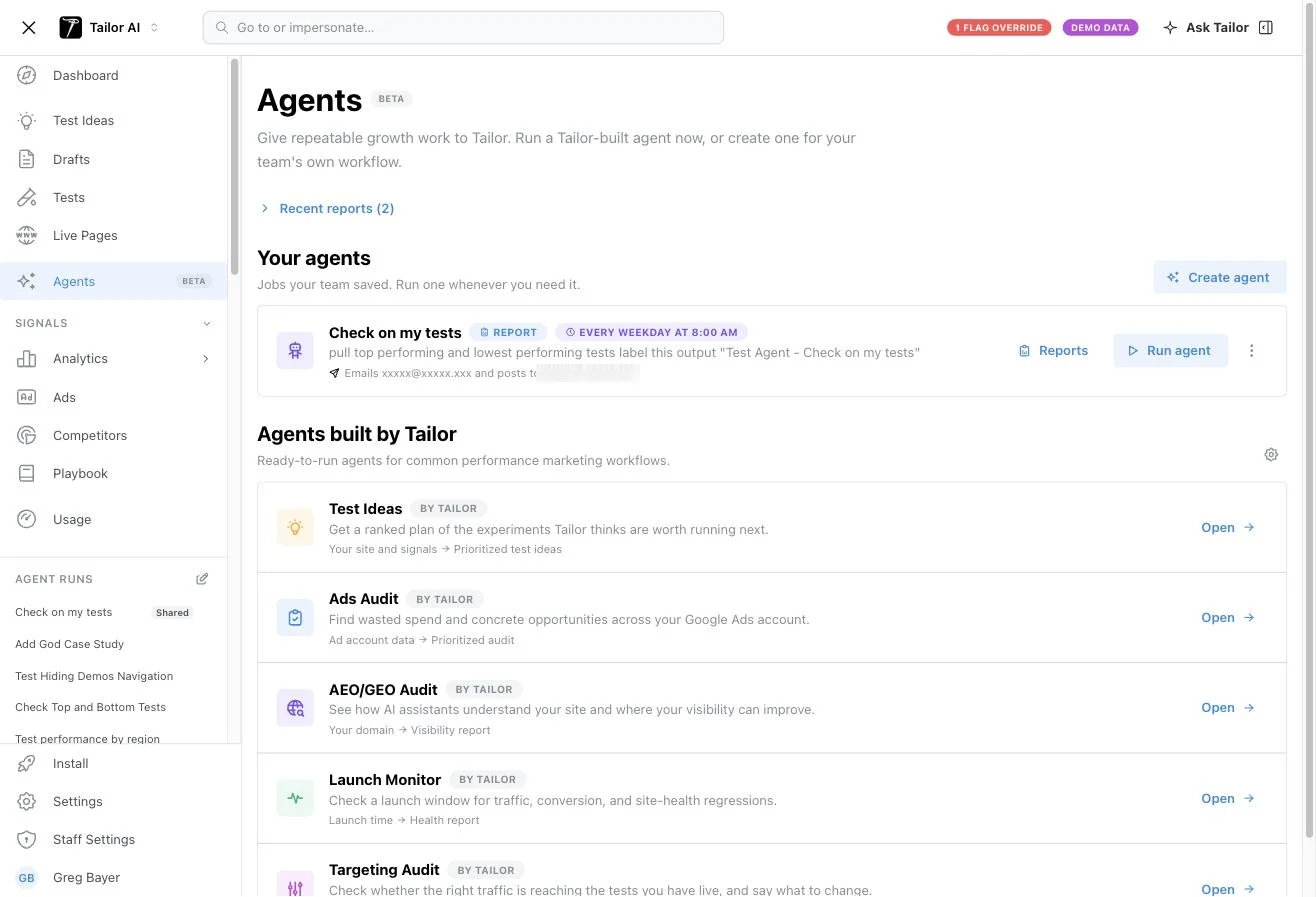
Work you repeat does not need re-asking. Save a job as an agent and it runs on a schedule, then emails the result and posts it to Slack.
Tailor ships agents for the common performance marketing jobs, each one a named set of inputs producing a named output: Test Ideas turns your site and signals into a prioritized plan, Ads Audit turns ad account data into a list of wasted spend and opportunities, Launch Monitor watches a launch window for traffic, conversion, and site-health regressions, and Targeting Audit checks whether the right traffic is actually reaching your live tests.
Run It From Your Own Agent
Everything above is available outside Tailor. Connect the Tailor MCP server at mcp.tailorhq.ai and your own assistant gets the same tools the built-in agent uses: your traffic and conversions, your ad accounts, enrichment, competitor reports, and the actions that create and launch experiments.
That is the part worth planning around. Your assistant already has context Tailor does not: your CRM, your margins, your roadmap, your support queue. Reading Tailor's data from there lets you weigh a test against things Tailor cannot see, then create it in the same conversation.
For example
- "Pull the segments converting below 2% and build a test for each one."
- "Cross-check our closed-won accounts against this month's identified visitors, then draft a page for the industries that actually buy."
- "Every Monday, check which live tests reached significance and open a ticket for the winners."
Tests created this way are labeled MCP rather than Agent, so you can tell in your reports which work came from inside Tailor and which came from your own stack. Approval still applies: an experiment created over MCP is a draft until someone launches it.
Working With It
- 1Long runs show a live plan with running counts (like "Translated 39 of 58") and the model's current reasoning under the active step.
- 2Past chats are one click away in the sidebar, and any reply can be copied, shared, or rated with thumbs up or down (add a note to tell us why).
- 3It knows your site. Say "our homepage" and it resolves to your actual domain.
For a standing queue of proactively generated experiment ideas (rather than a conversation), see Test Ideas.
Drafts & Labels
Tests the agent creates are labeled Agent and filed under Tailor Agent Drafts until you launch them. Agent-built pages get an auto-generated name describing the changes; once a test has ever been ramped, its name is never auto-changed, so the names in your reports and ad platforms stay stable. A "Remove AI label" action converts an agent draft into a regular draft if you take it over.
Tests created through an external AI assistant via MCP are labeled MCP, so you can tell the two apart.
Data & Privacy
How Your Data Is Used
Analysis may use aggregated or pseudonymous data. Any processing of Personal Data is done solely to provide the Services and in accordance with our Privacy Policy and your Data Processing Agreement.
Human Review & Control
The agent drafts and executes, but nothing goes live without review and approval by an authorized user. Tailor does not use AI to make automated decisions that produce legal or similarly significant effects.