
Use case · Google Ads
Your ads match intent. Your landing pages should too.
SEM teams manage hundreds of keywords with different intent, but send all that traffic to the same generic page. Branded, competitor, category, use-case specific. Different searches, same landing experience.
Google rewards relevance at the ad level and the page level. But building keyword-specific pages at scale is prohibitively slow. So most teams don’t. They optimize ad creative obsessively, then funnel clicks to a handful of static pages and hope for the best.
This page covers how keyword intent matching works, real patterns from paid search teams, Google Ads-specific considerations, and how to measure impact downstream.
By Tailor AI team · Last updated July 28, 2026
 Tailor AI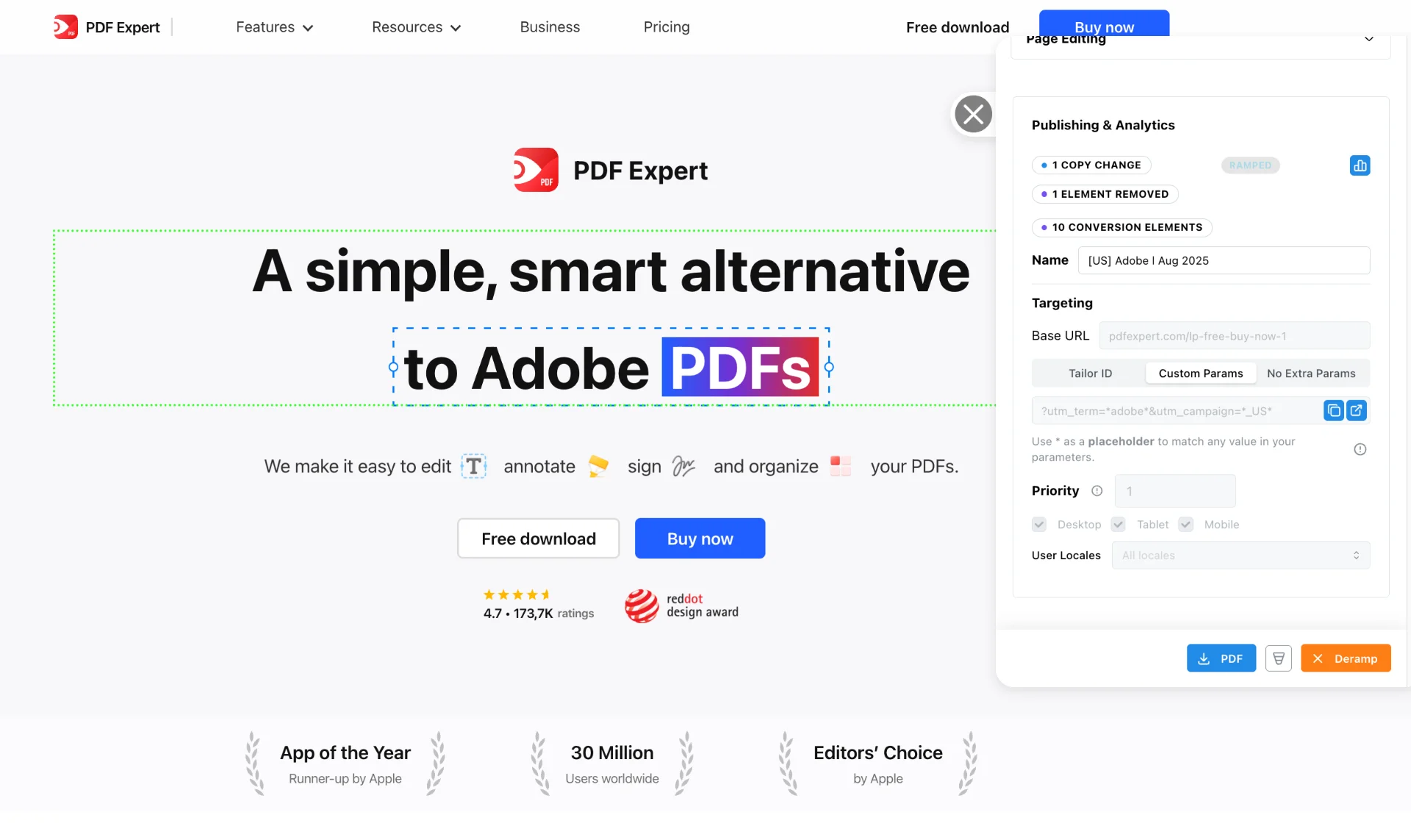
- Built from
- Hundreds of conversations with performance marketing teams running Google Ads campaigns across SaaS, e-commerce, healthcare, and financial services.
- What this covers
- How keyword intent matching works, real patterns from paid search teams, Google Ads-specific considerations, and how to measure impact.
Teams running Tailor






The problem
Hundreds of keywords. A handful of landing pages.
A common pattern we hear: teams run hundreds of ad variants across branded, competitor, category, and use-case keywords. All that traffic funnels to one to seven generic landing pages.
Many teams told us the same thing in different words:
"We have a thousand ads and only seven landing pages."
"It's impossible to keep up with all that different intent."
"These performance marketing teams are so focused on CTR and ad creative, then landing pages are glazed over."
The cost is measurable. Quality Score suffers when your landing page doesn’t match the keyword. Lower Quality Scores mean higher CPCs. Higher CPCs mean fewer clicks for the same budget. And generic pages convert worse than relevant ones, so the traffic you do get wastes more of itself.
Most marketers know this. Roughly 90% of the teams we talked to acknowledged the gap. But building keyword-specific pages is so much work that most teams just don’t do it. As one marketer put it: “It’s too much work to build new pages all the time. So the reality is we don’t build new landing pages very often.”
How it works
Signal, adaptation, measurement
Keyword intent matching follows a three-step loop:
- 1
Signal
Google Ads passes keyword, ad group, campaign, and match type via UTM parameters or gclid when someone clicks your ad. Tailor reads those parameters from the URL in real time.
- 2
Adaptation
Based on those signals, Tailor adapts page elements to match the searcher’s intent. Headlines, subheadlines, proof points, CTAs, even images. If someone searched "HIPAA compliant project management," they see HIPAA messaging. If they searched "Kanban board for teams," they see Kanban messaging. Same base page.
- 3
Measurement
Per-keyword experiment results tied to downstream outcomes. Not just CTR, but trial starts, demo requests, pipeline. Results show up in your existing analytics (GA4, Amplitude) where your team already looks.
In practice, teams use two approaches together. Hand-crafted adaptations for the top 5 to 10 highest-spend keywords, where the messaging and proof points are carefully chosen. Dynamic text replacement for the long tail, where the keyword or ad group name flows into the headline automatically. See it in action in the dynamic text replacement demo.
One line of JavaScript. No page rebuilds. No dev queue. Learn more about targeting by keyword and campaign.
Google Ads patterns
What paid search teams actually run into
- Keyword-level final URLs
- Google lets you set final URLs at the keyword level, not just the ad level. Teams that use keyword-level URLs combined with Tailor adaptations get the best of both: Google sees a relevant URL path, and the page content matches the keyword.
- Google rewards relevance at the topic level
- Quality Score factors in landing page experience. Pages that match the keyword topic (including the URL structure) tend to score higher. Lower Quality Scores mean higher CPCs, so this directly affects spend efficiency.
- Ad group aggregation limits reporting
- Google Ads reports at the ad group level by default, which hides keyword-level performance differences. One team called this a "material limitation." Tailor’s per-keyword experiment tracking fills this gap.
- Conversion-value bidding
- Sophisticated teams assign different conversion values to different actions ($1 for a form open, $200 for a form submission). When your landing page matches keyword intent better, higher-value conversions go up, and Smart Bidding responds by allocating more budget to those keywords.
- Hybrid approach for scale
- High-value keywords get hand-crafted experiences with specific proof points, case studies, and CTAs. Long-tail keywords get dynamic text replacement. This balances quality with coverage and keeps the workload realistic.
- AI Max and irrelevant search terms
- Google's AI Max feature can add irrelevant search terms to your campaigns. When your landing page adapts to the actual search intent (not just the campaign target), you recover some of that wasted spend by at least showing relevant content to mismatched clicks.
Performance Max
Tailoring pages for Performance Max campaigns
PMax has no keywords, and audience signals are suggestions Google may ignore. The asset group is the only intent unit you control, so that is what you pass to the page.
- 1
Structure asset groups by intent theme, one theme per group, and give each a custom URL parameter in the asset group's URL options (for example a parameter named ag with the value pmax-fitness-studios). There is no ValueTrack macro that inserts the asset group name automatically, so the value is hardcoded per group. Keep a strict naming taxonomy.
- 2
Append the parameter through a final URL suffix (utm_source=google&utm_medium=cpc&ag={_ag}) rather than editing final URLs. PMax URL expansion can land clicks on pages other than your final URL, and a suffix still gets appended to expanded URLs. Hardcoded parameters on the final URL do not survive that. Turning URL expansion off entirely is also a legitimate choice for control.
- 3
Target Tailor variants on the parameter (ag=pmax-fitness-* wildcard or OR rules), one variant set per asset group theme. Mechanically this is identical to UTM targeting.
- 4
Layer the signals PMax cannot give you. One asset group spans hot Search intent and cold Display and YouTube placements, and network macros are unreliable in PMax. Combine the asset group parameter with what Tailor sees on its own: device, geography, and company or role enrichment. For B2B, enrichment often becomes the strongest signal on PMax traffic precisely because the keyword is missing.
- 5
Verify before scaling: check the PMax landing page report for arriving URLs and Tailor's traffic view filtered by the parameter, then build out the full variant set.
Set expectations honestly: PMax deliberately hides most intent signal, so per-asset-group tailoring is coarser than per-keyword tailoring on Search. The win comes from asset group theme matching plus enrichment, not keyword-level message match.
See keyword intent matching on your pages
Industry examples
How teams apply keyword intent matching
Anonymized patterns from conversations with paid search teams across industries. No company names.
- PDF / document software
- One PDF software company runs 10+ keyword categories (convert, compress, edit, OCR, reader, form filling, annotators, signers) across multiple geos. They split test by intent cluster, showing editing-focused messaging to people searching for editors and annotation-focused content for annotation searches. Their approach: "If the user is searching for editor, we show content connected to editing. If it’s annotating, annotating."
- EHS / ergonomics SaaS
- An EHS software company builds keyword-specific pages for different assessment types (RULA, REBA, NIOSH) broken out by industry. Each assessment type has different buyer intent, so the proof points, compliance language, and CTAs adapt to match. Their keyword structure mirrors their product's assessment categories.
- Healthcare job board
- A healthcare job platform pre-selects filters based on keyword intent. Someone searching "travel nursing job in ICU" lands on a page with ICU and travel nursing already selected, reducing friction between the ad promise and the page experience. The page matches the specificity of the search.
- B2B project management
- A project management tool runs feature-by-feature keyword tests: Kanban board, to-do list, timeline view, resource management. Each keyword cluster gets messaging that leads with that specific feature, including relevant screenshots and use cases. Instead of a generic "project management software" page for every keyword.
Results vary by traffic volume, keyword mix, and how different the intent really is across keyword clusters. The pattern holds: more specific pages convert better than generic ones.
Measurement
Proving keyword experiments drive real outcomes
The biggest gap in landing page optimization isn’t running experiments. It’s proving they matter to the business. CTR and on-page clicks are a start, but they don’t answer the question your VP of Marketing is asking: did this move pipeline?
Many teams told us the same frustration: optimization results live in the optimization tool, not in the dashboard where their boss is looking.
"We have 40 to 50 ads live at any point in time and maybe four landing pages. We can't tell which page drove which conversion."
"They know these numbers. They have that number off the tip of their tongue. If you tell them it's a 22% lift, they can do the math."
What to measure, in order of difficulty:
- 1
On-page engagement: CTA clicks, form opens, scroll depth. Useful for quick reads, but not sufficient alone.
- 2
Conversion rate: signups, demo requests, form submissions. The immediate outcome most teams optimize for.
- 3
Downstream metrics: trial starts, pipeline created, revenue. Harder to attribute, but this is what matters.
- 4
Cost efficiency: CPA, ROAS, cost per qualified lead. The metric your finance team cares about.
Tailor fires experiment events into your existing analytics. GA4, Amplitude, Segment. Results show up where your team already looks, not in a separate dashboard they’ll forget to check. Set up conversion goals.
On statistical rigor:
A common guideline from teams we talked to: wait for at least 50 CTA clicks before reading experiment results. For lower-traffic pages, Bayesian methods can surface directional signals from smaller samples. Don’t rush to declare winners on thin data. More on A/B testing methodology.
FAQ
Frequently asked questions
Pass the keyword into the landing page URL as a parameter, then have the page read it and swap its own copy. In Google Ads, add the keyword to your final URL suffix (commonly utm_term={keyword}, or a custom parameter per ad group for Performance Max, which has no keywords). On the page, Tailor reads that parameter and replaces the headline, subhead, proof points, and CTA with the variant you approved for that keyword cluster. You are not creating a URL per keyword and you are not duplicating pages: one base page serves every variant, so an offer change updates once at the source. Start with the top 5 to 10 keywords by spend, where the mismatch costs the most, and use broader cluster rules for the long tail. PDF Expert ran exactly this setup on its SEM traffic and raised click-through 43%.
Yes, positively. Google evaluates landing page experience as part of Quality Score. Pages that match keyword intent typically see improved Quality Score, which can lower CPC. The page still needs to load fast and deliver relevant content, but keyword-aligned messaging is exactly what Google rewards.
Tailor reads UTM parameters, gclid, or other URL parameters that Google Ads passes when someone clicks your ad. You configure which parameter maps to which page adaptation. Most teams use utm_term or utm_campaign, but any URL parameter works.
No. Tailor adapts your existing page in place. One base page becomes hundreds of personalized landing pages, one per keyword variation, by changing headlines, proof points, and CTAs dynamically. No new URLs, no page rebuilds, no dev cycles.
Search engines see your original page structure. Tailor loads asynchronously via JavaScript, so crawlers index your base HTML. This is by design to preserve your SEO. Your organic rankings and indexing are not affected by Tailor because search engines see your original page structure.
Yes, with one adjustment: PMax has no keywords, so the asset group becomes the intent unit. Set a custom URL parameter per asset group, append it via a final URL suffix so it survives URL expansion, and target Tailor variants on that parameter. Then layer device, geo, and company enrichment on top, since one asset group spans both hot Search intent and colder Display and YouTube placements.
Start with your top 5 to 10 highest-spend keywords. Build hand-crafted adaptations for those. Then use dynamic text replacement for the long tail. Most teams see the biggest impact from their top keyword clusters, where spend is concentrated and the mismatch is most costly.
Your keywords deserve better than a generic page.
See Tailor match your Google Ads keywords to your landing page in minutes.
PDF Expert raised click-through 43% by matching its landing pages to the SEM keyword behind each visit.
Read the PDF Expert case study