
Use case · Geo, language, and device
Localized landing pages by geo, currency, language, and device. No separate pages required.
Paid campaigns increasingly target audiences across geographies, languages, and devices. But most teams still send all that traffic to the same English-language, desktop-designed page. The result: high bounce rates, wasted spend, and a gap between what the ad promised and what the page delivers.
Tailor adapts your existing landing pages to match visitor location, language, and device type. Translate pages using built-in AI or import your own translations. No duplicate pages, no CMS overhauls, no engineering queue.
Last updated September 12, 2026
 Tailor AI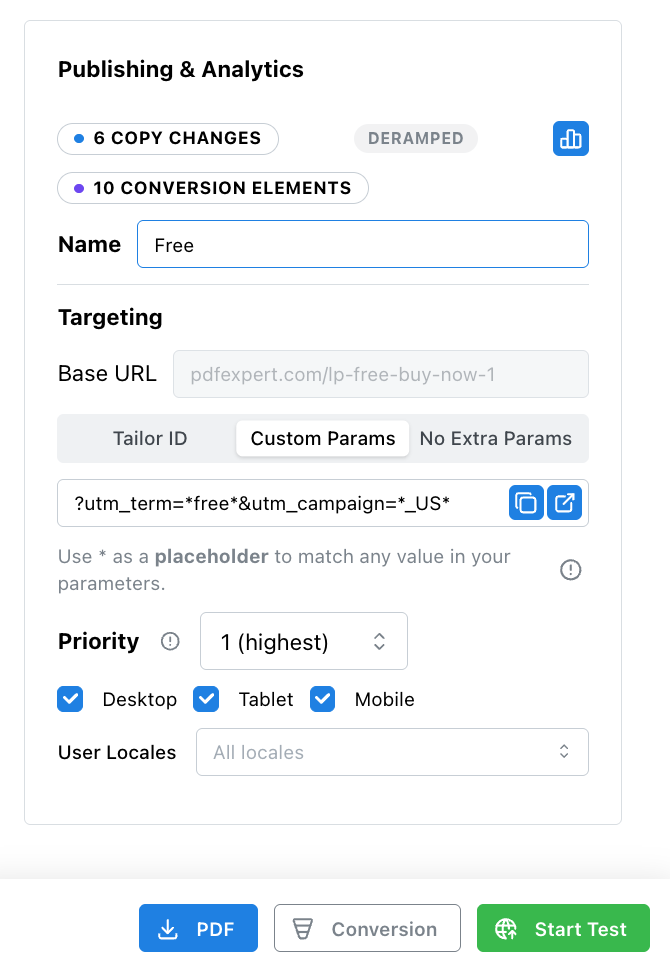
- The result
- One team reported ~50% lower CPA with Portuguese-language campaigns ($8/workspace vs $17 with English-only pages).
- How it works
- Tailor detects visitor geo, language, and device at page load and adapts content in the browser. Your original page stays intact for SEO.
Teams running Tailor






Context
Why geo, language, and device matter for paid traffic
When a team runs Spanish ads and Portuguese ads but sends all clicks to an English page, the conversion drop is immediate. The ad promised relevance. The page did not deliver.
Three signals compound the problem:
- Geography
- Visitors from different regions expect locally relevant messaging, pricing formats, and proof points. A visitor in Brazil and a visitor in Germany have different expectations from the same product page.
- Language
- Language is not just translation. Formal vs. informal register matters (critical in German, for example). Tone, idiom, and cultural context all affect whether the page feels native or foreign.
- Device
- Meta campaigns can be 99% mobile. Even LinkedIn B2B campaigns run 75% mobile according to teams we have spoken with. If the page was designed for desktop, three-quarters of your paid traffic is getting a suboptimal experience.
Each signal alone costs conversions. Combined, the gap between what the ad promised and what the page delivers grows wider with every audience you add.
The pain
How teams handle localization today
Most localization workflows were designed for website-wide translation, not campaign-specific adaptation. Here is what we hear from growth teams:
- CMS translation plugins
- Translation products typically plug into your CMS, translate every page, and run as a nightly job. They cost a fair amount of money and require a bunch of setup from engineering. For teams that just need three landing pages in Portuguese, that is overkill.
- Manual Figma-to-page workflow
- One growth lead told us: it takes forever to manually go into Figma, get the translation, drop it in, and swap out the image. Each language variant becomes a separate design file, a separate page build, and a separate QA cycle.
- Overlay-based translation hacks
- Some teams use overlay-based translation as a hack because their CMS is too rigid to handle per-campaign language variants. It works, but it is fragile, hard to maintain, and impossible to A/B test.
- Separate pages per language
- The brute-force approach: build and maintain a separate landing page for each language. This works at small scale but breaks down fast when you add new campaigns, need to update messaging, or want to test variants across languages.
“Translation is just another form of tailoring for an audience.” The insight is simple: if you can swap a headline for a keyword match, you can swap it for a language match too.
Capabilities
How Tailor adapts pages by geography and language
Tailor treats language and geography as targeting signals, the same way it handles campaign, keyword, or company enrichment. You define rules, provide the adapted content, and Tailor applies the changes at page load.
- Geo-targeted content swaps
- Define rules by country or region. Visitors from Brazil see Portuguese headlines and CTAs. Visitors from Germany see formal German copy. The original page remains the fallback.
- Language-specific messaging
- Go beyond word-for-word translation. Adjust register (formal vs. informal), swap culturally relevant proof points, and change images to match local expectations.
- Campaign-level language targeting
- Running Spanish ads pointing to an English page? Create a language variant that fires only for visitors from that specific campaign. No need to translate every page on your site.
- AI-powered translation
- When creating a localized variant in Tailor's Chrome extension, you can auto-translate the page using built-in AI translation. Select a target language and Tailor translates all visible text on the page. You can then edit individual elements to fine-tune tone, register, or terminology before publishing.
- CSV export for translation review
- Prefer human review? Export all adaptable text as CSV, send it to your translation team or agency, and import approved translations back. This works well for regulated industries or brand-sensitive copy where AI translation needs a human pass.
- Non-destructive overlays
- Tailor applies changes in the browser. Your original page stays exactly as published. Pause an experiment or language variant at any time and visitors see the base page.
Designed to preserve SEO. Search engines see your original page structure unchanged. Tailor loads asynchronously, so crawlers index the base HTML.
Currency and offers
How do you localize a landing page for different currencies and offers?
Translating the copy is the easy half. The price and the offer are what decide whether the page converts. A visitor in Germany reading fluent German next to a dollar price, a US-only guarantee, and a payment method they do not use has been given a translated page, not a local one. Three things have to move together: the currency and price format, the offer or plan available in that market, and the trust signals that only mean something locally: VAT treatment, accepted payment methods, regional compliance statements, and a support timezone the visitor can actually reach.
Tailor does this on your existing page rather than in a duplicate of it. Country comes from the visitor’s IP, and campaign context comes from the ad that sent them, so a rule can be as specific as “visitors from Germany arriving on the EU pricing campaign see euro pricing, VAT-inclusive wording, SEPA in the payment list, and the EU case study.” The price itself comes from whatever already holds it, whether that is your CMS, a pricing table, or a feed, so a change is made once at the source rather than in every localized copy of the page. There are no new URLs: one base page serves every market, which is why the base page keeps its links and its rankings.
The alternative most teams reach for first is a page per market, and it works right up until the offer changes. At that point someone has to find and update every localized copy, and the ones nobody remembers keep serving last quarter’s price.
What this is worth shows up in cost per acquisition, not in a translation-quality score. One customer running paid campaigns into Brazilian Portuguese pages cut its cost per signup from about $17 to about $8 by localizing the page the ads landed on, against the same campaigns and the same spend.
How fast this moves is the part teams underestimate. Warp rewrote the banner across 105 blog pages in under three minutes, with no ticket and no deploy. A currency switch across a market runs on the same mechanism: one rule, applied wherever it matches.
One caveat, stated plainly: adaptations Tailor applies in the browser are for visitors, and AI assistants reading your site do not run JavaScript. If a market’s pricing needs to be quotable by an assistant, or indexed as its own page, write it into the page source. Tailor can save the change into a connected CMS as a draft for exactly this reason.
See geo and language adaptation on your pages
Or read the ad-to-page playbook or watch the translation walkthrough.
Device
Device-specific optimization for paid campaigns
Most landing pages are designed on desktop and tested on desktop. But when you look at actual campaign traffic, the numbers tell a different story. Teams running Meta campaigns report up to 99% mobile traffic. Even LinkedIn B2B campaigns see around 75% mobile.
Responsive CSS handles layout. But layout is not the same as conversion optimization. A form that works on desktop might need to become a single-field capture on mobile. A three-column proof section might need to collapse to the single most relevant proof point.
- Mobile-specific CTAs
- Swap a multi-field form for a tap-to-call button or a single-email capture. Reduce friction for thumb-driven interactions.
- Content prioritization by device
- Show the most compelling proof point first on mobile instead of spreading three equally across the page. Shorter attention spans need faster conviction.
- Mobile preview for approval workflows
- Preview exactly what mobile visitors will see before publishing. Critical for teams where stakeholders need to approve page changes and most of them check on their phones.
- Combined geo and device rules
- Stack signals: mobile visitors from Brazil see a compact Portuguese layout. Desktop visitors from Germany see the full formal German page. Rules compose without extra pages.
A growth lead told us: “Mobile preview is critical. Most of our team reviews on their phones, and if the page does not look right there, it does not ship.”
Getting started
Implementation approach
- 1
Start with your highest-spend non-English campaigns
Identify the campaigns where you are running ads in one language but landing visitors on a page in another. These have the biggest immediate gap and the clearest ROI.
- 2
Adapt the landing page, not the whole site
You do not need to translate your entire website. Start with the specific pages tied to paid campaigns. Tailor adapts those pages without touching the rest of your site.
- 3
Provide translations and set geo rules
Export page text as CSV, get it translated and reviewed, then import it back. Set targeting rules by country, region, or language preference. Tailor handles the rest at page load.
- 4
Add device-specific adaptations
Layer in device rules on top of geo/language targeting. Swap CTAs, reorder content, or simplify layouts for mobile visitors. Preview on both devices before publishing.
- 5
Measure downstream impact
Track conversions by language and device segment, not just overall. Tailor ties results to trials, pipeline, and revenue so you can see which localization efforts actually drive business outcomes.
Most teams go from “English-only landing page” to “localized, device-optimized variants” in a single afternoon. No engineering tickets, no CMS migration, no nightly translation jobs.
FAQ
Frequently asked questions
Yes. Tailor reads the visitor's country from their IP and swaps the price, the currency symbol, and the number format on your existing page, so a German visitor sees €1.234,56 where a US visitor sees $1,234.56. The figures come from wherever they already live, such as your CMS or a pricing table, so a price change is made once at the source instead of in every localized copy of the page. No duplicate URLs are created.
Yes, and the offer is usually the part that matters more than the translation. Rules combine country with campaign context, so 'visitors from Germany on the EU pricing campaign' can see euro pricing, VAT-inclusive wording, SEPA among the payment methods, and an EU customer story, while US visitors on the same base page see none of that. Rules stack with language and device rules you have already defined.
No. Tailor adapts your existing page in the browser. It swaps text, images, and CTAs based on visitor signals (geo, language preference, device) without creating duplicate URLs or pages. Your original page structure stays intact for SEO.
Tailor uses the visitor's IP address to determine their country and region. You define rules like 'visitors from Brazil see Portuguese copy' or 'visitors from Germany see formal German messaging.' The adaptation happens at page load, before the visitor interacts.
Yes. Tailor offers two paths: use the built-in AI translation to auto-translate the page in the Chrome extension (then review and edit before publishing), or export content as CSV, send it to your translation team, and import approved translations. Either way, nothing publishes until you approve it.
It can, depending on your setup. Traditional CMS translation tools run nightly jobs, translate every page, and require engineering setup. Tailor lets you selectively adapt pages for specific campaigns and audiences. Many teams use Tailor for campaign landing pages and keep their CMS plugin for the rest of the site.
Tailor detects device type as a separate signal. You can combine geo and device rules. For example, 'mobile visitors from Brazil see a compact Portuguese layout with a tap-to-call CTA' while 'desktop visitors from Brazil see the full Portuguese page with a form.' Rules stack, so you define them once and they apply together.
If the ad is in Portuguese, the page shouldn't be in English.
Adapt pages by geo, language, and device without building separate pages or waiting on engineering.
Warp's search marketer put a new banner on 105 blog pages in under three minutes, with no ticket and no deploy.
Read the Warp case study